A date in a PDF goes stale more often than any other detail: an invoice that needs a new due date, a letter you are re-sending, a contract draft whose effective date moved, an event flyer for next year. The source file is often gone, and retyping the whole document to change one line is slow.
You can change the date in the PDF itself. With LanaPDF you click the date, type the new one, and it stays in the document's own font, in the same place. It runs in your browser and the file is not uploaded.
In this guide
First: Is It Your Document?
Change dates only on documents you wrote or are authorized to change: your own invoices, quotes, letters, drafts and forms. Changing a date on a document someone else issued, such as a bank statement, a pay stub, a certificate, an ID or an official letter, and passing it off as genuine is fraud in most countries. If an issuer's date is wrong, ask the issuer for a corrected copy.
Change a Date in Four Steps
- Open the PDF in the LanaPDF editor. Drag it onto the page or click to choose it. Chrome, Safari, Edge and Firefox all work, on a computer or a phone.
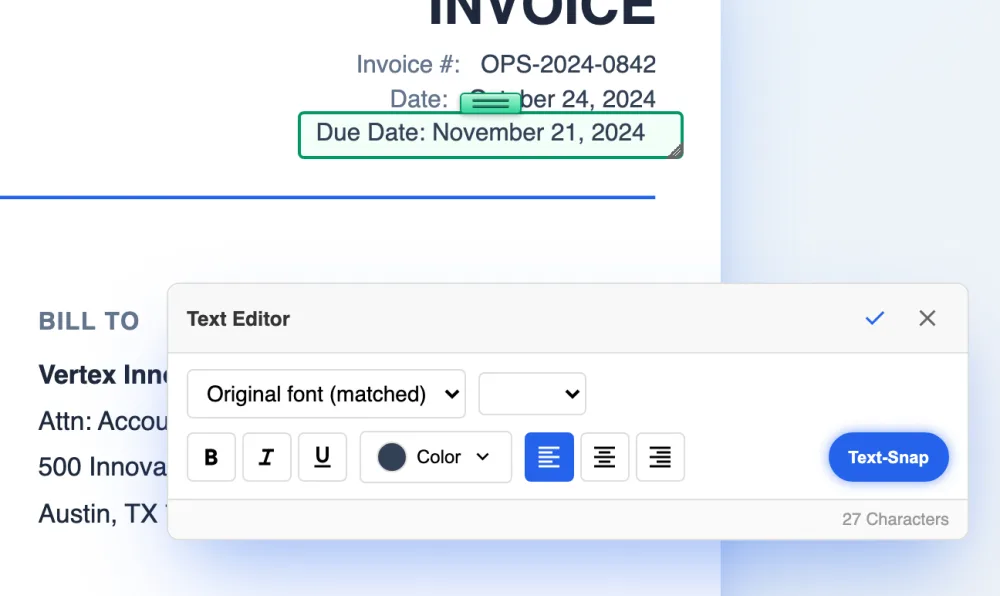
- Choose the Text tool and click the date. The whole line opens for editing, for example Due Date: November 07, 2024, in the font embedded in the PDF. The Text Editor panel says Original font (matched).
- Type the new date. Keep the same format as the rest of the document (07 vs 7, Nov vs November). Press the check mark or click outside the box.
- Save. The new date is written onto the page and the old one is removed from the file.
The same steps change any other line: a name, an amount, an address. See changing text in a PDF with the same font for the details, and fixing a typo in a PDF contract for the contract case.
Why Not Cover It With a White Box?
Most free PDF tools, and Preview on a Mac, cannot change text that is already in a PDF. The usual workaround is to draw a white rectangle over the old date and type the new one in a text box. It has two problems:
- The font rarely matches. The text box uses whatever fonts the tool offers, so the new date looks pasted on.
- The old date is still in the file. Anyone who copies the text, searches the PDF or opens it in another program can read the date under the box.
An in-place edit avoids both: the new date is in the document's font, and the old one is gone.
Dates on Scanned PDFs
If clicking the date does nothing, the page is probably a scan: a picture of text with no words to open. Run OCR from the Tools menu first. It recognizes the words on your device, and then the Text tool can open the date line. On a scan the new date is matched for size and weight in a standard typeface, because a scan has no font file to copy. See editing a scanned PDF.
Checklist Before You Send
- The date appears in more than one place? Search the PDF (Ctrl+F or Cmd+F) for the old date and change every copy: header, footer, signature block, payment terms.
- Weekdays still match. If the document says Friday, March 6, check the new date falls on the same weekday, or change both.
- Related dates still make sense: a due date after the issue date, an end date after a start date.
- Open the saved file and search for the old date once more. It should not be found.
- If others have already signed the document, do not change it. Send a new version for signature instead.
FAQ
How do I change the date on a PDF?
Open the PDF in LanaPDF at lana-pdf.com/app, choose the Text tool and click the date. The line opens in the document's own font. Type the new date, press the check mark and save. The old date is removed from the file.
Can I change a date on a PDF for free?
Editing is free and needs no account. Your first export, meaning the first download, print or Google Drive save, is free too, with no account and no card, and carries a small LanaPDF footer. After that, and for exports without the footer, a 7-day pass is $4 and does not renew, or membership is $6 a month.
Can I change the date on a PDF without Adobe Acrobat?
Yes. LanaPDF runs in Chrome, Safari, Edge or Firefox and edits the existing date in place, in the document's font, without Acrobat or any install.
Is it legal to change the date on a PDF?
It is fine on documents you wrote or are authorized to change, such as your own invoices, letters and drafts. Changing a date on a document someone else issued, such as a bank statement, pay stub or certificate, and presenting it as genuine is fraud in most countries. Ask the issuer for a corrected copy instead.
Change a date in your PDF now
Click the date, retype it in the document's own font, save. Free to edit, no upload.
Change Text in a PDF