You have a form that people should fill in on a screen: a client intake sheet, an order form, a registration or permission slip. It exists as a PDF, a Word export, or only as a sheet of paper. In Adobe, adding form fields is part of Acrobat Pro, a monthly subscription.
LanaPDF adds real form fields in your browser. Draw a box where the answer goes, choose the field type, and save. The result is an ordinary fillable PDF that works in Acrobat Reader, Preview and Chrome.
In this guide
What a Fillable PDF Is
A fillable PDF has form fields: boxes, checkboxes and lists that the reader can click and fill in. The answers are stored in the file, so they can be read, changed and printed. A flat PDF is only a picture of a form, and people have to print it or type on top of it.
Make a PDF Fillable in Five Steps
- Open the form in the LanaPDF editor. A PDF, or a photo or scan of a paper form as JPG or PNG.
- Open the Tools menu and pick a field type under Forms: Text field, Checkbox, Radio or Dropdown.
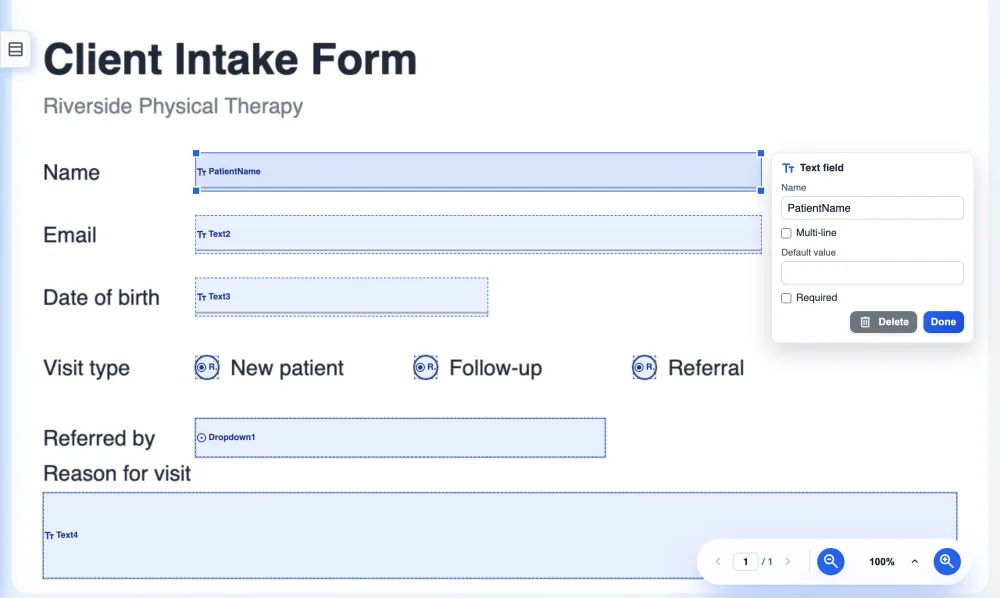
- Drag a box over the blank space where the answer goes: the line after Name, the square next to Yes.
- Set the details in the field's panel: its name, whether it is required, the choices for a dropdown, the group for radio buttons. Move or resize the box until it sits on the line.
- Save. The fields are written into the PDF as standard form fields.
Which Field to Use
| Field | Use it for |
|---|---|
| Text field | Names, dates, amounts, addresses. Turn on multi-line for comments and longer answers. |
| Checkbox | Yes/no items and "tick all that apply" lists. |
| Radio | One choice from a few, such as Mr / Ms / Mx. Give every button in the set the same group so picking one clears the others. |
| Dropdown | One choice from a longer list, such as a state or a department. |
Name fields after what they hold, such as FirstName or StartDate. Whoever collects the forms sees these names when they export the answers.
Making a Scanned Paper Form Fillable
Take a straight, well-lit photo of the form or scan it, and open the image in LanaPDF. Draw the fields over the blank lines exactly as with any PDF, and save: you get a PDF of the scanned page with live fields on top.
For a cleaner result, scan flat at 300 dpi and crop the edges. If you also want the printed words on the scan to be searchable, run OCR from the Tools menu; see OCR a PDF.
Test the Form Before You Send It
- Switch to the Select tool and fill in every field yourself. Tab moves through them.
- Save, then open the saved file in another app, such as Acrobat Reader, Preview or Chrome, and fill it in there.
- Clear your test answers before you send the blank form: delete the text and untick the boxes, then save again.
People filling it in can use any PDF app, including LanaPDF; see how to fill out a PDF form.
Checklist
- Every blank line and box has a field.
- Radio buttons that belong together share one group.
- Fields are named after what they hold.
- Tested in a second app.
- Test answers cleared before sending.
FAQ
How do I make a PDF fillable for free?
Open the PDF in LanaPDF at lana-pdf.com/app. In the Tools menu, pick Text field, Checkbox, Radio or Dropdown under Forms, drag a box where each answer goes, and save. The fields are standard PDF form fields.
Can I make a scanned document fillable?
Yes. Open the scan or photo, as a PDF, JPG or PNG, in LanaPDF, draw fields over the blank lines and save. The result is a PDF of the scanned page with fillable fields on top.
Will the fields work in Adobe Reader and Preview?
Yes. LanaPDF writes standard AcroForm fields, which Adobe Acrobat and Reader, macOS Preview, Chrome, Edge and Firefox can fill in.
Can I make a PDF fillable without Acrobat Pro?
Yes. Adding fields in LanaPDF needs no Acrobat and no install. Editing and exporting are free and need no account or card: download, print or save to Google Drive as often as you like. Free exports carry a small LanaPDF footer on each page. For exports without the footer, a 7-day pass is $4 and does not renew, or membership is $6 a month.
Make your form fillable now
Draw the fields, save a standard fillable PDF. No Acrobat Pro. The tool page: create a fillable PDF.
Open the LanaPDF Editor