Create a fillable PDF: draw the fields and save
Open a flat PDF, a scan or a photo of a paper form, choose Tools > Forms and drag a box wherever an answer goes. Text fields, checkboxes, radio groups and dropdowns become real PDF form fields that people fill in Adobe Reader, Preview, Chrome or LanaPDF.
How to create a fillable PDF
- Open lana-pdf.com/app and drop in the form. A PDF, or a JPG or PNG of a paper form.
- Choose Tools > Forms and pick Text field, Checkbox, Radio or Dropdown.
- Drag a box where the answer goes. A single click places a field of the default size. Drag a field to move it and its corners to resize it.
- Set the field in its panel: name, required, multi-line, dropdown options, default value. Radio buttons placed one after another form one group.
- Switch to Select to try the fields, then Save.
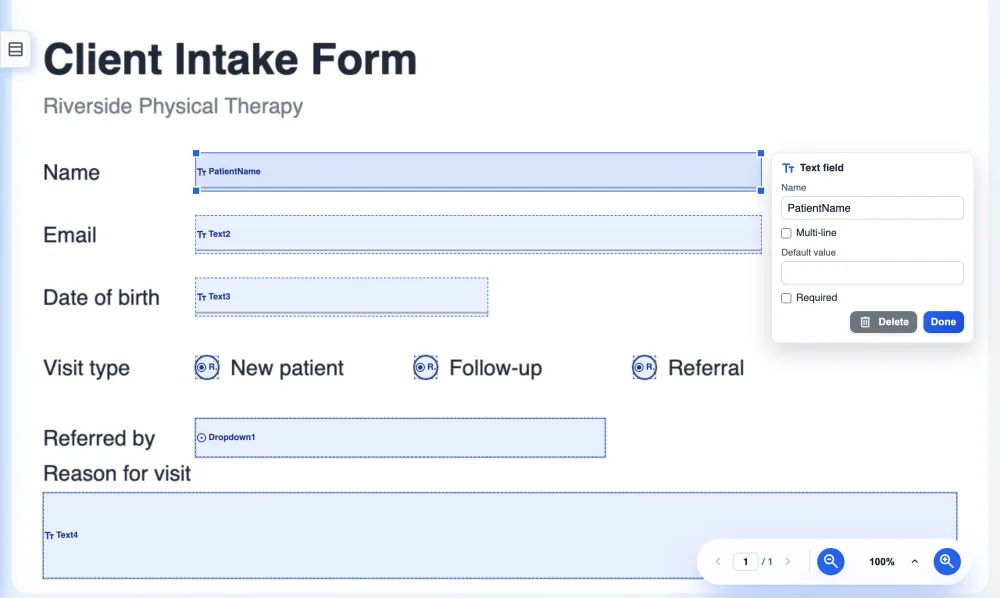
Which field for which answer
| Field | Use it for |
|---|---|
| Text field | Names, dates, amounts, reference numbers. Tick multi-line for comments and addresses. |
| Checkbox | Yes or no, consent, "tick all that apply". |
| Radio group | One choice from a few options shown side by side. |
| Dropdown | One choice from a longer list, such as a state or a department. |
Make a scanned or photographed form fillable
Open the scan as a PDF, or open the photo (JPG or PNG) directly, and draw the fields over the blanks. The saved PDF carries the page image with fillable fields on top, so a form that only existed on paper can be filled in on a computer or phone. Place fields a little inside each printed box so the typed answer does not touch the lines.
Before you send it
Test in a second app
Open the saved file in Adobe Reader or Preview and fill it once.
Name the fields
Clear names such as PatientName help if the answers are collected into a spreadsheet later.
Protect it
Add a password or block editing of the page; see protect a PDF.
Fill it yourself
The finished form fills in LanaPDF too; see fill in a PDF form.
FAQ
How do I create a fillable PDF for free?
Open the PDF at lana-pdf.com/app, choose Tools > Forms, drag a box for each answer and save. The fields are real PDF form fields that open in any PDF reader.
Can I make a scanned form fillable?
Yes. Open the scan as a PDF, or a JPG or PNG image, draw the fields over the blanks and save. The saved PDF carries the page image with fillable fields on top.
Which form fields can I add?
Text fields (single or multi-line), checkboxes, radio button groups and dropdown lists. Each field can have a name, a default value and a required flag.
Do the fields work in Adobe Reader and Preview?
Yes. LanaPDF saves standard PDF form fields with a fixed text size, so they fill the same way in Adobe Reader, Apple Preview, Chrome and Edge.
Is it free to make a PDF fillable?
Editing and exporting are free and need no account or card: download, print or save to Google Drive as often as you like. Free exports carry a small LanaPDF footer on each page. For exports without the footer, a 7-day pass is $4 and does not renew, or membership is $6 a month.