PDF won't open? Find out why, then fix the file
"Failed to load PDF document", "The file is damaged and could not be repaired", a blank page. Most of the time the file was cut off in transit, damaged by repeated editing, protected by a password, or is not a PDF at all. Drop it into LanaPDF: it tells you which, rebuilds what it can, and repairs the rest in your browser.
Why a PDF won't open, and what LanaPDF does
| Cause | Typical sign | What LanaPDF does |
|---|---|---|
| It is not a PDF | Every app refuses it. Often a Word file, a web page or a photo renamed to .pdf | Reads the file's contents and tells you what it really is. A JPG or PNG named .pdf opens as an image. |
| The download or attachment was cut off | An error on open; the file is smaller than expected | Rebuilds the file's missing index from the parts that arrived and opens them, with a PDF recovered notice. |
| The structure is damaged | Opens in one app but not another, or prints garbled characters | Standard Repair rewrites the structure; Deep Repair rebuilds every page cleanly. |
| It is password protected | A password prompt, or some apps refuse it | Asks for the password. Files with only editing restrictions open without one. |
| The viewer is the problem | It opens on another device or in another app | If it opens in LanaPDF, the file is fine; update or switch the app that failed. |
How to fix a PDF that won't open
- Open lana-pdf.com/app and drop the file in. Recovery runs automatically. If the file is not a PDF, you are told what it is instead.
- If you see "PDF recovered", check the pages and save a copy. That copy opens in other apps again.
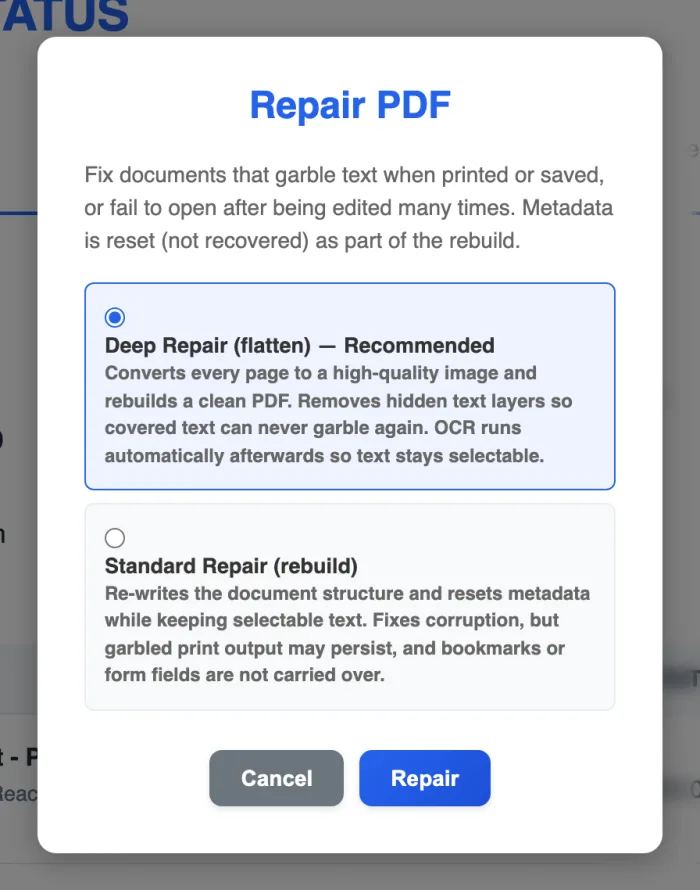
- If it opens but prints garbled text or other apps still reject it, open Tools and choose Repair.
- Pick Deep Repair or Standard Repair. Deep Repair rebuilds every page as a clean image and runs OCR afterwards so the text stays selectable. Standard Repair rewrites the structure and keeps the original text.
- Save the repaired PDF.
When a file cannot be saved
If a file is empty, or was cut off before any page data arrived, there is nothing left to rebuild and no tool can recover it. LanaPDF says so instead of showing a blank document. Ask the sender for a new copy, or download it again, ideally without a phone's mail preview in between.
If only some pages survive, Deep Repair keeps those and tells you that others could not be rendered.
Related problems
Garbled printing
The PDF looks right on screen but prints strange symbols. See fixing garbled PDF printing.
Scanned or flattened pages
After Deep Repair or on a scan, run OCR to get selectable text. See editing a scanned PDF.
Repair tool
Both repair modes compared, with what each keeps. See Repair PDF.
Then edit it
Once it opens, change the text, redact or sign in the same editor. See changing text in a PDF.
FAQ
Why won't my PDF open?
The usual causes are a download or email attachment that was cut off, a file damaged by repeated editing, a password, or a file that is not a PDF at all despite its name. Open it in LanaPDF: it identifies the file type, rebuilds damaged files automatically and offers Repair for the rest.
Can a corrupted PDF be fixed?
Often, yes. If the page data is still in the file, LanaPDF rebuilds the damaged index when you open it, and Standard or Deep Repair fixes files that still misbehave. A file that is empty or was cut off before any page arrived cannot be recovered.
How do I fix a corrupted PDF for free?
Editing is free and needs no account. Your first export, meaning the first download, print or Google Drive save, is free too, with no account and no card, and carries a small LanaPDF footer. After that, and for exports without the footer, a 7-day pass is $4 and does not renew, or membership is $6 a month.
Why does my PDF open on my phone but not on my computer?
When a file opens on one device, the file is usually fine and the app on the other device is the problem. Update that app or open the file in a browser at lana-pdf.com/app.
Is my PDF uploaded for repair?
No. Recovery and repair run inside your browser on your device. The file is not sent to our servers.