Edit a PDF on Android, including the text already in it
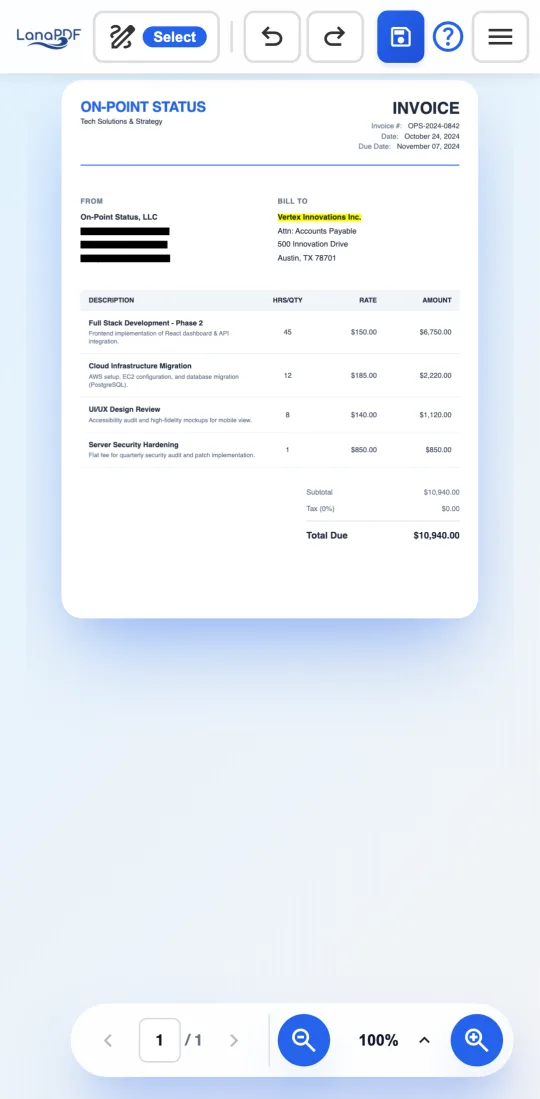
Open the PDF in Chrome, tap a line and type. LanaPDF changes the words that are already in the document, in the document's own font, instead of laying a text box on top. Nothing to install, and the file is processed on your phone, not uploaded.
How to edit a PDF on Android
- Open lana-pdf.com/app in Chrome. Android tablets work the same way.
- Tap the upload area and choose the PDF. Android's file picker shows Downloads, Google Drive and your other storage folders.
- Choose the Text tool, then tap the line you want to change. The whole line opens for editing in the matched font and size, and the keyboard comes up straight away.
- Type the correction and tap the check mark. Pinch to zoom in on small print first if you need to.
- Tap the Save button, name the file and tap Save. Chrome saves the PDF to your Downloads folder.
What Google Drive's PDF viewer cannot do
The PDF viewer in the Google Drive app can highlight, draw and fill in form fields. It cannot change a word that is already on the page: a typo in a contract, a wrong date, an old address.
The common workaround is Open with Google Docs, which converts the PDF into a document. The text becomes editable, but the layout, fonts and images usually do not survive the conversion, and the PDF you export afterwards no longer looks like the original. LanaPDF edits the PDF itself, so everything you did not touch stays exactly as it was.
| Task | Google Drive viewer | LanaPDF in Chrome |
|---|---|---|
| Change text already in the PDF | No (Google Docs converts the file) | Yes, in the original font |
| Move a paragraph, price or image | No | Yes, with Cut & Move |
| Redact so the text is gone from the file | No | Yes |
| Highlight, draw | Yes | Yes |
| Fill in form fields | Yes | Yes, type on the page |
What works by touch
Edit existing text
Tap a line to rewrite it in place. New text boxes open on a tap too.
Redact
Drag over names, account numbers or addresses. The text under the box is removed when you save.
Sign with your finger
Draw a signature on the pad and tap the page where it goes.
Highlight and draw
Highlighter, pen, shapes, arrows and numbered bubbles.
Cut & Move
Drag around a block of the page and tap where it should go.
Pages
Reorder, rotate and delete pages, or add pages from another PDF.
Common fixes on the go
Most phone edits are small and urgent: a typo in a contract before it goes out for signature, a date on a form, an amount on an invoice. For documents you are about to send, redact the account numbers first, then sign. If a paragraph sits in the wrong place, move it instead of retyping it.
A larger screen is still easier for long documents. The same editor runs on Chromebooks, Macs and Windows PCs.
FAQ
Can I edit the text of a PDF on my Android phone?
Yes. Open lana-pdf.com/app in Chrome, choose the Text tool and tap the line you want to change. LanaPDF edits the words already in the PDF and matches the document's font, so the correction reads as part of the original.
Do I need to install an app to edit a PDF on Android?
No. LanaPDF runs in Chrome on Android phones and tablets. To keep it on your home screen, open lana-pdf.com/app, tap the Chrome menu, then Add to Home screen or Install app.
Is my PDF uploaded when I edit it on Android?
No. The file is opened and edited inside the browser on your phone. It is not sent to our servers.
Is it free to edit a PDF on Android with LanaPDF?
Editing is free and needs no account. Your first export, meaning the first download, print or Google Drive save, is free too, with no account and no card. After that, a 7-day pass is $4 and does not renew, or membership is $6 a month.
Why not open the PDF with Google Docs instead?
Opening a PDF with Google Docs converts it into a document. The text becomes editable, but the layout, fonts and images usually do not survive the conversion, and you have to export a new PDF that no longer looks like the original. LanaPDF edits the PDF itself.