Add text to a PDF: click where it goes and type
Choose the Text tool, click any blank spot on the page and start typing. Set the font, size and color, and let Text-Snap line your text up with the printed words next to it. It works on forms that have no fillable fields, runs in your browser, and the file is not uploaded.
How to add text to a PDF
- Open lana-pdf.com/app and drop the PDF in. It works in Chrome, Safari, Edge and Firefox, on a computer or a phone.
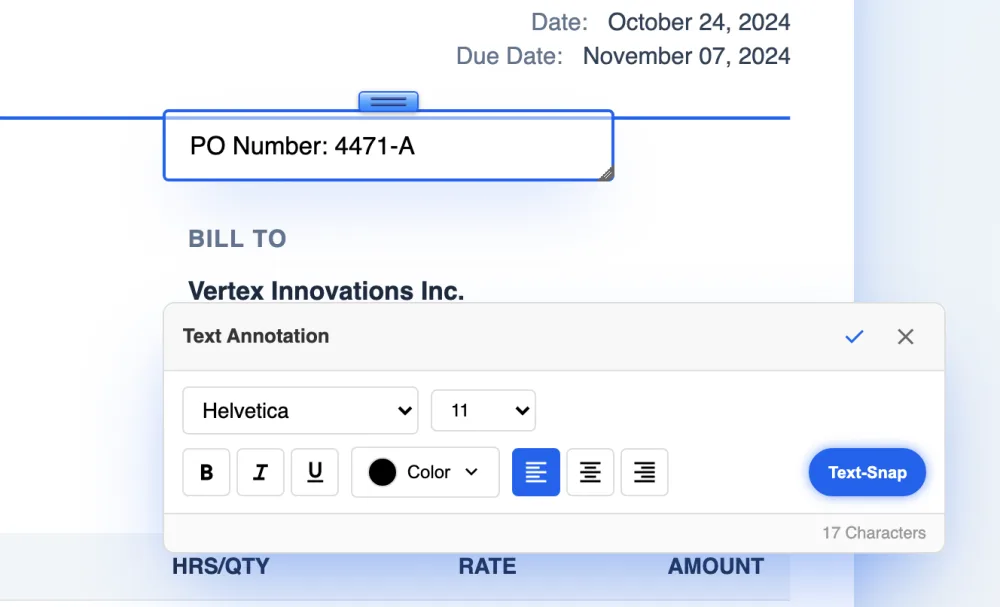
- Choose the Text tool and click a blank spot. A text box opens where you clicked, with the Text Annotation panel next to it. On a phone, tap and the keyboard comes up.
- Type, then style it. Pick the font and size, set the color, and use bold, italic, underline or alignment. Press Enter for a new line.
- Place it. Drag the handle on top of the box to move it. With Text-Snap on, the box settles on the baseline of the printed text beside it.
- Press the check mark, then Save. To change a finished box, double-click it with the Select tool.
Fill in a PDF form that is not fillable
Many forms arrive as plain PDFs or scans with no fields to click into, so a PDF reader has nowhere to type. With LanaPDF you type the answers onto the page yourself:
- Click just after each label, such as Name or Date of birth, and type the answer. On a digitally created form, Text-Snap puts it level with the label.
- For a checkbox, click inside the box and type X.
- Add your signature with the Sign tool and place it on the line.
- On a scanned form, zoom in and place each answer by eye.
If your PDF does have real form fields, most PDF readers let you type in them directly. LanaPDF is for the forms that don't.
Adding text or changing text?
The same Text tool does both. Click blank space and you add a new text box. Click words that are already in the PDF and you edit them in place, in the document's own font; see changing text in a PDF. To add text on top of existing words without editing them, start the box in a blank spot next to them and drag it into position.
What people add
Form answers
Names, addresses and dates on applications and intake forms with no fields.
Notes and labels
A reference number, a note for the next reader, a label on a drawing. For numbered callouts use Numbered Bubbles.
Right-to-left text
Arabic and other right-to-left scripts type in the correct direction.
Signatures and initials
Draw or type a signature and place it on the line. See Sign PDF.
FAQ
How do I add text to a PDF?
Open the PDF at lana-pdf.com/app, choose the Text tool and click a blank spot on the page. A text box opens there. Type, choose the font, size and color, press the check mark and save.
How do I add text to a PDF for free?
Editing is free and needs no account. Your first export, meaning the first download, print or Google Drive save, is free too, with no account and no card, and carries a small LanaPDF footer. After that, and for exports without the footer, a 7-day pass is $4 and does not renew, or membership is $6 a month.
How do I fill in a PDF that is not fillable?
Open it in LanaPDF, choose the Text tool and click just after each label to type the answer. On a digitally created form, Text-Snap lines the answer up with the label. Type X in checkboxes and use the Sign tool for the signature.
Can I add text to a PDF on my phone?
Yes. Open lana-pdf.com/app in Safari or Chrome, choose the Text tool and tap where the text goes. The keyboard opens and you type as on a computer.
Is my PDF uploaded when I add text?
No. The PDF is opened and edited inside your browser. It is not sent to our servers.