Protect a PDF with a password, on your own device
Open the PDF, choose Tools > Document > Protect, type a password and save. The copy you save is encrypted with AES-256 inside the browser tab, so the unprotected file is never uploaded anywhere, including to us. You can edit, fill in or sign it first.
How to protect a PDF with a password
- Open lana-pdf.com/app and drop the PDF in. It works in Chrome, Safari, Edge and Firefox, on a computer or a phone.
- Make your changes first, if any. Fix a line of text, fill in the form fields, add a signature.
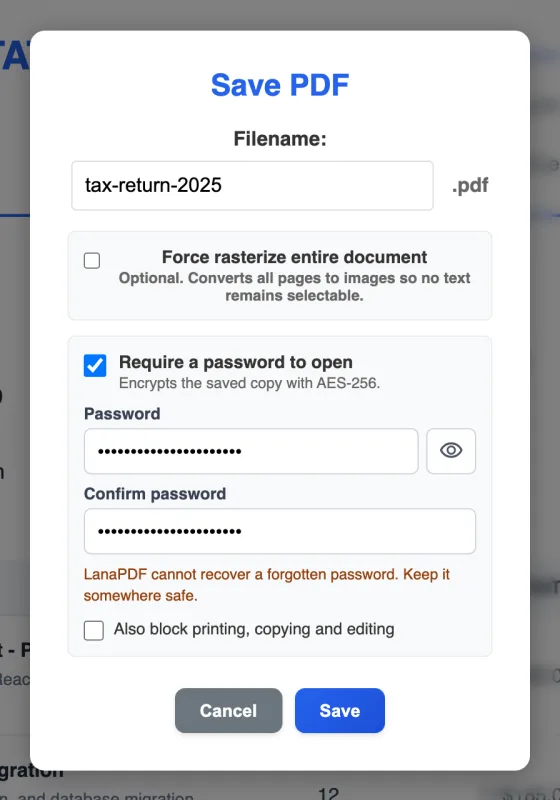
- Choose Tools > Document > Protect. The Save dialog opens with Require a password to open ticked.
- Type the password twice. The eye button shows it so you can check for typos. LanaPDF cannot recover a forgotten password, so keep it somewhere safe.
- Optional: tick Also block printing, copying and editing.
- Save. The download and a copy saved to Google Drive are both encrypted.
What the password does, and what the restrictions do
| Option | Effect | How strong |
|---|---|---|
| Require a password to open | The PDF will not open without the password. Its contents are encrypted with AES-256. | Encryption: without the password the contents cannot be read. |
| Also block printing, copying and editing | After opening, the reader disables printing, copying text and changes. | Honoured by Adobe Acrobat and Reader and many other readers. Some readers ignore it, so treat it as a request, not a lock. |
Choose a passphrase of four or more unrelated words rather than a short word with a number on the end. More on choosing one in how to password protect a PDF.
Why lock it here rather than on an upload site
Most online "protect PDF" tools ask you to upload the unprotected file to their server first, which is the copy you were trying to keep private. LanaPDF runs the encryption (qpdf, compiled to WebAssembly) in your browser. The file and the password stay on your device: the password is kept in memory for this tab only, and it is not saved, logged or sent.
Send the file and the password by different routes, for example the PDF by email and the password by text message or phone call. Anyone who gets the email alone cannot open it.
What people lock
Contracts and offers
Edit the terms, sign, then lock the copy you send to the client.
Filled-in forms
Fill in an application with personal details and protect it before you email it. See fill in a PDF form.
Documents with hidden details
Redact what the recipient should not see, then add a password for what they should.
A new password
Open a protected PDF with its old password and save it with a new one. See unlock a PDF.
FAQ
How do I protect a PDF with a password?
Open the PDF at lana-pdf.com/app, choose Tools > Document > Protect, type the password twice and save. The saved copy asks for that password before it opens.
Is my PDF uploaded when I protect it?
No. The encryption runs in your browser. The unprotected file and the password stay on your device and are not sent to our servers.
What encryption does LanaPDF use?
AES-256, the strongest encryption the PDF format supports. Adobe Acrobat and Reader, Apple Preview, Chrome, Edge and Firefox open the file when given the password.
Can I stop people printing or copying my PDF?
Yes. Tick "Also block printing, copying and editing" under the password. Readers that honour PDF permissions, such as Adobe Acrobat and Reader, then disable those actions. The open password is the strong protection; the restrictions depend on the reader.
Is it free to password protect a PDF?
Editing and exporting are free and need no account or card: download, print or save to Google Drive as often as you like. Free exports carry a small LanaPDF footer on each page. For exports without the footer, a 7-day pass is $4 and does not renew, or membership is $6 a month.