A password on a PDF is useful until you have typed it for the tenth time, or until an upload portal, a print shop or an e-signature service rejects the file because it is encrypted. Your bank statements, pay slips and utility bills often arrive this way, protected with your date of birth or the last digits of an account number.
If you know the password, you can save a copy without it. With LanaPDF you type the password once, untick one box and save. It runs in your browser: the file and the password stay on your device.
In this guide
First: You Need the Password
LanaPDF does not guess or crack passwords. A PDF protected with an open password is encrypted, and without the password no honest tool can read it. If you have lost the password, ask whoever sent the file for an unprotected copy. Remove passwords only from files you own or are allowed to change.
Two Kinds of PDF Password
| Password | What it does | What you see |
|---|---|---|
| Open password (user password) | Encrypts the file. Nobody can read it without the password. | A password prompt before the first page shows. |
| Permissions password (owner password) | Opens without a prompt, but asks apps to block printing, copying or editing. | "Secured" in the title bar, greyed-out Print or Edit buttons. |
LanaPDF removes both from the copy you save.
Remove an Open Password in Four Steps
- Open the PDF in the LanaPDF editor. Drag it onto the page or click to choose it. Chrome, Safari, Edge and Firefox all work, on a computer or a phone.
- Type the password when asked. It is checked on your device and never sent anywhere. A note confirms the file is unlocked in LanaPDF.
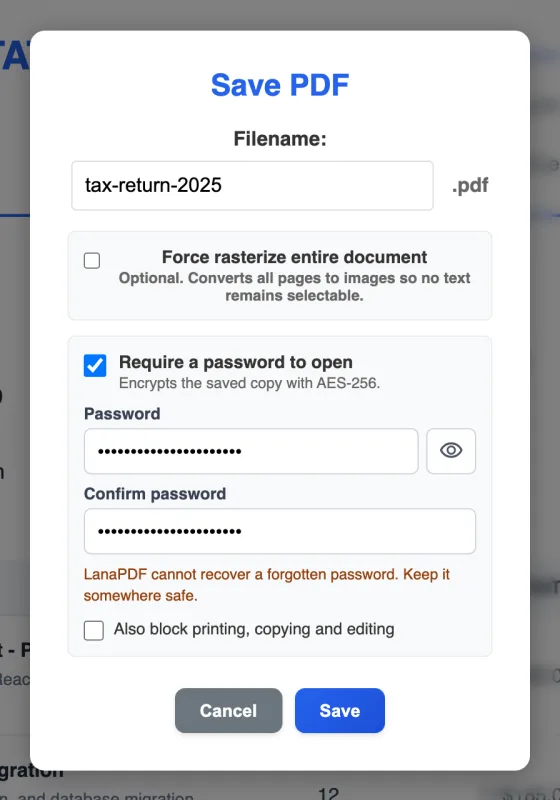
- Click Save. Because the file had a password, the Save dialog starts with Require a password to open ticked and your password filled in. Untick it.
- Save. The new copy opens anywhere without a password. The original file is not changed.
Remove Printing, Copying and Editing Restrictions
A PDF with only a permissions password opens in LanaPDF without a prompt. Edit it if you need to, then save: the copy has no restrictions, so it prints, copies and edits normally in any app. Use this on documents you have the right to change, such as your own forms and statements.
Why the Text Stays Selectable
The common workarounds for a locked PDF, such as printing it to a new PDF or taking screenshots, often turn the pages into pictures. Text can no longer be searched or copied, and the file gets bigger.
LanaPDF decrypts the file itself. The saved copy keeps its real text, fonts and vector graphics, so you can still search it, copy from it and edit the text. If the file is also damaged, see what to do when a PDF won't open.
Change the Password Instead
To replace a weak password, such as a date of birth, with a stronger one: open the file, keep Require a password to open ticked, type the new password twice and save. See how to password protect a PDF for choosing one.
Checklist
- You own the file or are allowed to remove its password.
- The unlocked copy is stored somewhere private. Without the password, anyone who gets the file can read it.
- Open the saved copy once: it should open with no prompt.
- Sending it on? Hide what the recipient does not need first with redaction, which removes the text instead of covering it.
FAQ
How do I remove a password from a PDF?
Open the PDF in LanaPDF at lana-pdf.com/app and type its password. Click Save, untick Require a password to open, and save. The new copy opens without a password and keeps its text.
Can I remove a PDF password without knowing it?
No. An open password encrypts the file, and LanaPDF does not guess or crack passwords. If you lost it, ask the sender for an unprotected copy. Files that only restrict printing or editing open without a password, and LanaPDF saves them without the restrictions.
Is it free to remove a password from a PDF?
Editing and exporting are free and need no account or card: download, print or save to Google Drive as often as you like. Free exports carry a small LanaPDF footer on each page. For exports without the footer, a 7-day pass is $4 and does not renew, or membership is $6 a month.
Can I unlock a PDF on a Mac, iPhone or Android phone?
Yes. LanaPDF runs in the browser on Mac, Windows, Chromebook, iPhone, iPad and Android. The password and the file stay on your device.
Unlock your PDF now
Type the password once, save a copy without it. Nothing is uploaded. The tool page: unlock a PDF.
Open the LanaPDF Editor