Unlock a PDF, then edit it like any other
Drop in a password-protected PDF and type its password. LanaPDF decrypts it on your device, so you can change the text, fill in fields and sign, then save a copy with no password, the same one or a new one. Files that only block printing, copying or editing open with no password at all.
LanaPDF unlocks files you can already open: you need the password, or the file has restrictions but no open password. It does not guess or crack passwords. Only remove protection from files you have the right to change.
How to unlock a PDF
- Open lana-pdf.com/app and drop the PDF in. It works in Chrome, Safari, Edge and Firefox, on a computer or a phone.
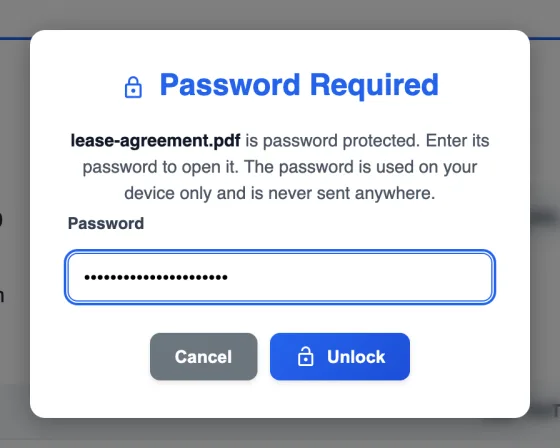
- Type the password and press Unlock. A wrong password asks again. The password is used on your device only.
- Edit if you need to. Change text, fill in fields, redact, sign, or add and remove pages.
- Click Save. Require a password to open starts ticked with the old password. Untick it to save an unlocked copy, or type a new password to change it.
- Save. The new copy opens without a password, and its text is still text.
Remove printing, copying and editing restrictions
Some PDFs open without a password but will not let you print, copy text or make changes. They carry a permissions password (also called an owner password) instead of an open password. LanaPDF opens these directly, and the Save dialog tells you the restrictions are removed in the copy you save. To send the file on with restrictions again, tick Require a password to open and Also block printing, copying and editing; see protect a PDF.
Why the text stays selectable
Many browser tools "unlock" a PDF by printing each page to an image, which leaves you with a file you cannot search, copy from or edit. LanaPDF decrypts the file itself (qpdf, compiled to WebAssembly), so text, fonts, links and form fields come through as they were. That is also why you can edit an unlocked PDF with the Text tool straight away: see change text in a PDF.
It opens AES-256, AES-128 and the older RC4 encryption, the methods PDF software uses to protect files.
When you open a protected PDF
Save it without the password
Untick Require a password to open in the Save dialog.
Keep the password
Leave it ticked. The saved copy uses the same password, and form values you typed are kept.
Change the password
Type a new password twice in the Save dialog.
Pick up later
Save Session keeps the encrypted original, never the password, and asks for it again when you resume.
FAQ
How do I unlock a PDF?
Open it at lana-pdf.com/app and type its password. Click Save, untick "Require a password to open" and save. The new copy opens without a password.
Can I unlock a PDF without the password?
If the PDF asks for a password to open, you need that password; LanaPDF does not guess or crack it. If it opens without a password but blocks printing, copying or editing, LanaPDF opens it and the copy you save has no restrictions.
Can I edit a password-protected PDF?
Yes. After you type the password the document is decrypted on your device, so the Text tool, forms, redaction and page tools all work, and the saved copy keeps real, selectable text.
Is my PDF or my password uploaded?
No. Decryption runs in your browser. The password is kept in memory for this tab only and is not saved, logged or sent.
Is it free to unlock a PDF?
Editing and exporting are free and need no account or card: download, print or save to Google Drive as often as you like. Free exports carry a small LanaPDF footer on each page. For exports without the footer, a 7-day pass is $4 and does not renew, or membership is $6 a month.