Your Social Security number turns up in more PDFs than you might expect: benefits enrollment forms, tax returns, W-2s, pay stubs, loan paperwork, court filings. When one of those documents has to go to someone who does not need the number, the safe move is to redact it before you send it.
Redacting is not the same as covering. A black rectangle drawn in most PDF tools hides the digits on screen, but the number is still in the file, and anyone can copy it out. This guide shows how to remove an SSN from a PDF for real, how to keep the last four digits when a recipient asks for them, and how to check the result before you send it.
In this guide
What a Redacted SSN Means
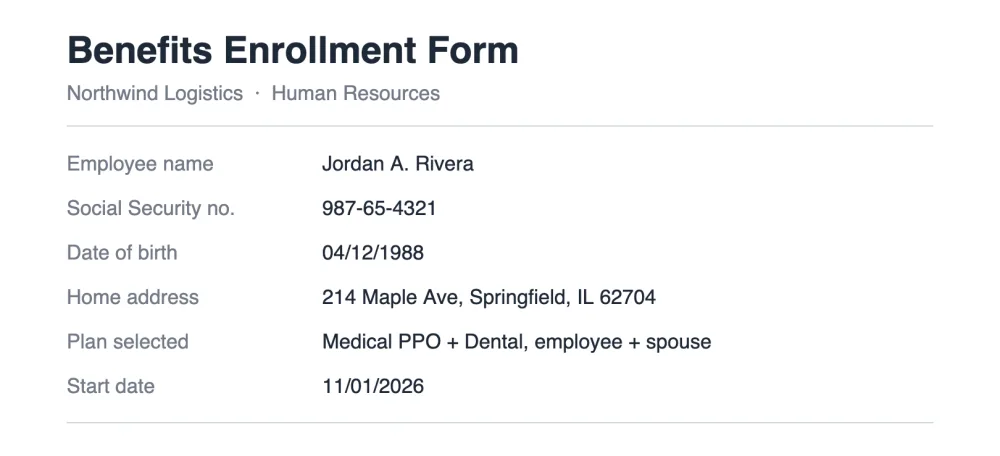
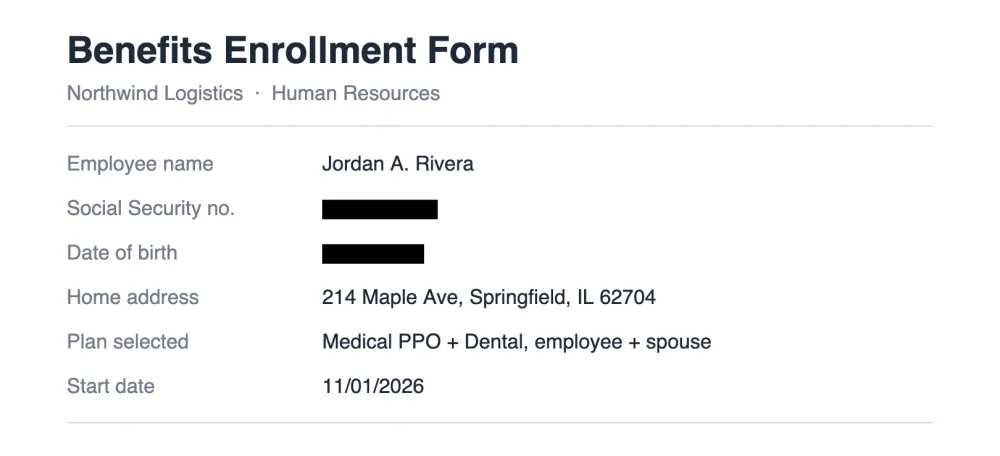
A redacted Social Security number has been removed from the document so the person who receives it cannot read or recover it. It usually shows as a solid black bar, or as XXX-XX-4321 when the last four digits are left visible so the recipient can match the document to you.
Courts use the same convention. Federal court rules (Fed. R. Civ. P. 5.2 and Fed. R. Bankr. P. 9037) allow only the last four digits of a Social Security number in public filings, and many state courts follow similar rules.
Who Needs the Full Number
- The IRS and your tax preparer. Returns are filed under your full SSN. Do not redact it for them.
- Your employer's payroll team, for tax withholding and reporting.
- The Social Security Administration and other agencies paying benefits.
- Banks and lenders opening an account or running a credit check, on the application itself.
The supporting documents you attach are a different matter. A pay stub, a bank statement or a copy of a W-2 sent as proof of income rarely needs the number, even when the application form asks for it separately. If you are unsure, ask the recipient whether a copy with the SSN redacted is acceptable. Most say yes.
Redact an SSN in Five Steps
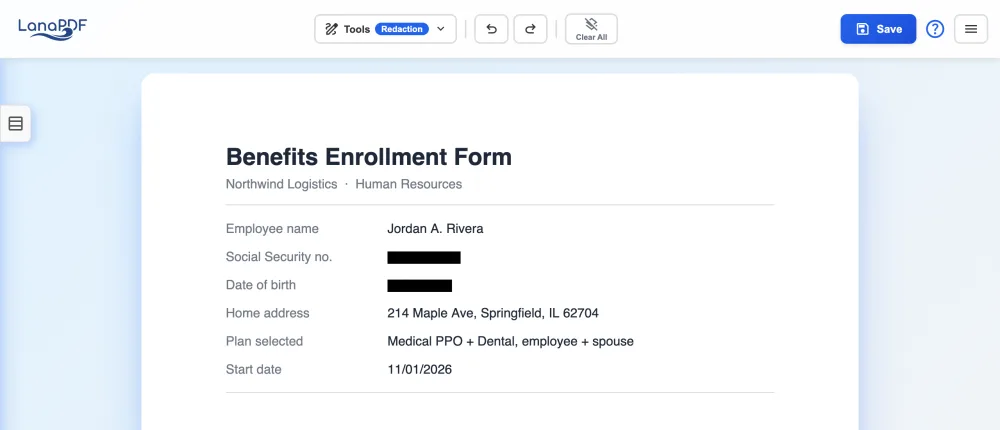
- Open the PDF in the LanaPDF editor. Drag it onto the page or click to choose it. It opens in your browser; the file is not uploaded.
- Find every copy of the number. Multi-page forms often repeat the SSN in a header or on each schedule. Press Ctrl+F (Cmd+F on a Mac) in any PDF viewer and search for the last four digits to find them all.
- Choose Tools > Redact and drag across the number. The box snaps to the line of text it covers. Repeat for each copy, and for any other details the recipient does not need, such as a date of birth.
- Save. Every page with a redaction is saved as a flattened image with a hidden text layer that leaves out the covered words. The SSN is removed from the file, and the rest of the page can still be searched and copied.
- Check the saved file with the checklist below before you send it.
Keep the Last Four Digits
Some recipients ask for the last four digits to confirm your identity. Drag the redaction box across the first five digits only, 987-65-, and stop before the last four. The box ends where you let go, so the saved page shows the last four and a black bar where the rest was.
The visible digits stay on the page as part of the image, but the number no longer exists as text in the file. A search for any part of it, including the last four, finds nothing.
Why a Black Box Is Not Enough
The usual quick fix is to draw a black rectangle or a thick highlight over the number. In most PDF tools that only adds a shape on top. The digits underneath are still text in the file: select the area, copy, paste into a note, and the full SSN appears. Search finds it too, and so does any program that reads the text layer. Why redacted text is still in your PDF shows how often this happens.
In Adobe Acrobat, true redaction is the Redact tool in Acrobat Pro, a paid subscription. LanaPDF removes the covered text when it saves, in any modern browser, with no install. For other text, such as names and addresses, see blacking out text in a PDF.
Scanned Documents and Photos
A scanned form or a phone photo of one is a picture of the page. Open it the same way (LanaPDF opens PDFs and JPG or PNG images) and drag the Redact box over the number; the box is burned into the image when you save.
Many scanner apps add an invisible text layer to a scan so it can be searched. That hidden layer contains the SSN too. LanaPDF treats it like any other text: the covered words are left out when you save. To make the rest of a scan searchable afterwards, see OCR a PDF.
Checklist Before You Send
- Open the saved file and search (Ctrl+F or Cmd+F) for the last four digits and for the first three. Nothing should be found.
- Select all the text on the page, copy it and paste it into a note. The number should not appear.
- Check every page, including headers, footers and attached schedules.
- Check the file name. W2-987654321.pdf undoes the redaction.
- Attach the saved copy, not the original. Keep the unredacted original somewhere private.
FAQ
How do I redact a Social Security number in a PDF?
Open the PDF in LanaPDF at lana-pdf.com/app, choose Tools > Redact and drag across the number. Save the file. Pages with a redaction are saved flattened and the covered digits are removed from the file, so searching the saved PDF for them finds nothing.
Can I keep the last four digits of my SSN visible?
Yes. Drag the redaction box across the first five digits only and stop before the last four. The saved page still shows the last four, while the number no longer exists as text in the file.
Can I redact an SSN without Adobe Acrobat?
Yes. Acrobat's Redact tool is part of Acrobat Pro. LanaPDF redacts in Chrome, Safari, Edge or Firefox with no install, and the file is not uploaded.
Is it free to redact a PDF?
Editing and exporting are free and need no account or card: download, print or save to Google Drive as often as you like. Free exports carry a small LanaPDF footer watermark on each page. For exports without the footer watermark, a 7-day pass is $1.50 and does not renew, or membership is $6 a month.
Redact an SSN in your PDF now
Drag across the number, save, and it is gone from the file. Runs in your browser, no upload.
Redact a PDF